Main Telegram Bot Function#
Background#
- This code are implemented on Google App Script and link to a Google Sheets
- In this page is just the basic Telegram bot api on google Script
Set up#
Create Telegram Bot#
- Use
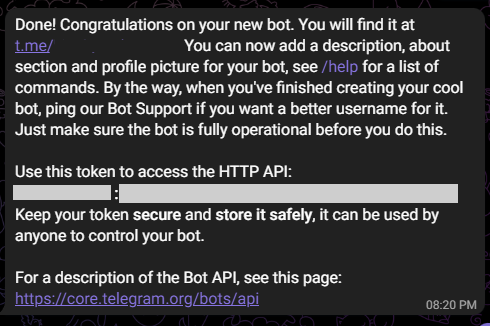
@BotFatherfrom Telegram to create a bot - The bot token will be generated once done
Create Google Create App Script#
Method 1: Through Google Sheets#
- In your sheets tool bar: Extensions > App Script
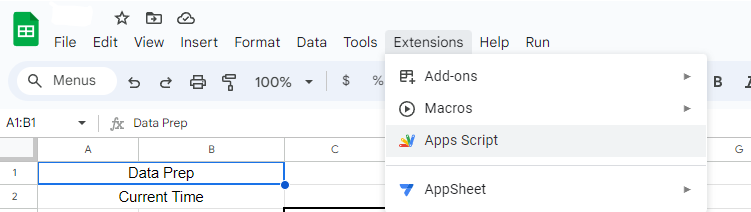
- Create your project name. Can be anything
Method 2: Through Google App Script#
- Go to Google App Script
- Create a new project
- Create your project name. Can be anything
Telegram Bot Code#
Set Variables#
- Copy the bot token and insert it into the token , line 1
- webAppUrl can be blank as it will only be generated once the script is deployed
- myid is your own unique telegram ID.
- Use
@raw_info_botto get your unique chat id. - This will be used to check the message to the bot is from this ID.
- Use
Code:#
var token = 'xxxxxxxxx1234zzzzz';
var webAppUrl = 'https://script.google.com/xxxxxxxx'
var telegramurl = 'https://api.telegram.org/bot' + token;
var myid = '123456789'
Set /help command text#
Code:#
var help_msg = `
/info : for debuging

/help : this list will be printed

You can write anything in this text
`
Initalise the bot#
- To Fetch the bot
- Webhook to set the bot to this script
- Included removeWebhook to remove the bot if needed
Code:#
function getMe() {
  var url = telegramUrl + "/getMe";
  var response = UrlFetchApp.fetch(url);
  Logger.log(response.getContentText());
}


function setWebhook() {
  var url = telegramUrl + "/setWebhook?url=" + webAppUrl;
  var response = UrlFetchApp.fetch(url);
  Logger.log(response.getContentText());
}


function removeWebhook() {
  var url = telegramUrl + "/setWebhook?remove";
  var response = UrlFetchApp.fetch(url);
  Logger.log(response.getContentText());
}


function doGet(e) {
  return HtmlService.createHtmlOutput("Bot is working");
}
Run:#
- Save the script and run the following function:
- Run
getMe() - Run
setWebhook()- This is to set the bot to this script
- Run
doGet(e)
Basic Bot Method#
- There are more methods available you can refer to the Telegram Bot API Docs
- Most of my functions just takes in the neccessary arguments. There are optional arguments that can be added
Code:#
function setCommand() {
  var data = {
    method: "post",
    payload: {
      method: "setMyCommands",
      commands: JSON.stringify([
        {
          command: 'today',
          description: "See Today's Calendar"
        },
        {
          command: 'help',
          description: 'Get Help'
        }
      ]
      )
    }
  };
  UrlFetchApp.fetch(telegramUrl + '/', data);
}


function forwardMessage(id,from_chat_id,message_id){
  var data = {
      method: "post",
      payload: {
        method: "forwardMessage",
        chat_id: String(id),
        from_chat_id : String(from_chat_id),
        message_id : message_id,
        parse_mode: "HTML",
      }
    }
    UrlFetchApp.fetch('https://api.telegram.org/bot' + token + '/', data);
}


function sendText(id, text, keyboard,notification) {
  if (keyboard == undefined && notification == undefined) {
    var url = telegramUrl + "/sendMessage?chat_id=" + id + "&text=" + encodeURIComponent(text);
    UrlFetchApp.fetch(url);

  } else if (notification == false) {
    var url = telegramUrl + "/sendMessage?chat_id=" + id + "&text=" + encodeURIComponent(text) + "&disable_notification=True";
    UrlFetchApp.fetch(url);

  } else {
    var data = {
      method: "post",
      payload: {
        method: "sendMessage",
        chat_id: String(id),
        text: text,
        parse_mode: "HTML",
        reply_markup: JSON.stringify(keyboard)
      }
    }
    UrlFetchApp.fetch('https://api.telegram.org/bot' + token + '/', data);
  }
}


function sendPhoto(id,photo,caption,keyboard){
  if(keyboard == undefined){
    var data = {
      method: "post",
      payload: {
        method: "sendPhoto",
        chat_id: String(id),
        photo: String(photo),
        caption: String(caption),
        parse_mode: "HTML",
      }
    }
    UrlFetchApp.fetch('https://api.telegram.org/bot' + token + '/', data);

  } else {
    var data = {
      method: "post",
      payload: {
        method: "sendPhoto",
        chat_id: String(id),
        photo: String(photo),
        caption: String(caption),
        parse_mode: "HTML",
        reply_markup: JSON.stringify(keyboard)
      }
    }
    UrlFetchApp.fetch('https://api.telegram.org/bot' + token + '/', data);
  }
}


function reply_text(id, message_id, text) {
  var url = telegramUrl + "/sendMessage?chat_id=" + id + "&reply_to_message_id=" + message_id + "&text=" + text;
  UrlFetchApp.fetch(url);
}


function deleteMessage(msgid, chatid) {
  var data = {
    method: "post",
    payload: {
      method: "deleteMessage",
      chat_id: String(chatid),
      message_id: String(msgid)
    }
  };
  UrlFetchApp.fetch(telegramUrl + "/", data);

}


function create_reply_markup(name,data){
  var data =
          [{
            "text": name,
            "callback_data": data
          }]
  return data
}


function reply_markup(name,data){
  var make_button = {"inline_keyboard": []}
  var buttons = []
  var arrlenght = name.length

  for (var i = 0; i <arrlenght; i++){
    buttons.push(create_reply_markup(name[i],data[i]))
  }

  make_button.inline_keyboard = buttons
  return make_button
}
Code Explanation:#
Set Command#
- This is to set the command for the bot.
- It will appear to user with the '/' icon beside the sticker
- Easier way to run command without typing it
- Note!!:
- No spacing in the command is allowed
- No capital letter allowed
- Once done, Run the function alone
Forward Message#
- This is to forward message
- Arguments needed:
- id: Chat ID to forward the chat to
- from_chat_id: Chat ID of orign message
- message_id: Message ID to get the specific message to forward
Send Text#
- To send text
- can be PM, Group Chat or Channel, all depends on the Chat ID
- Arguments needed:
- id: Chat ID to send the text to
- text: The text message to send
- keyboard: Any reply markup or other keyboard replies
- notification: Silent text or notify user when the message is sent (Boolean)
Send Photo#
- To send photo to user
- Arguments needed:
- id: Chat ID to send the image to
- photo: The photo URL to send the image
- caption: Caption for the image sent
- keyboard: Any reply markup or other keyboard replies
Reply Text#
- Reply to the specific text
- Arguments needed:
- id: the chat id
- message_id: the message id of the message to reply to
- text: text to reply to that message
Delete Message#
- Delete Specific Message
- Arguments needed:
- msgid: Message id of the message to be deleted
- chatid: Chat ID of the message
Create Reply Markup#
- A supporting function for Reply Markup function
Reply Markup#
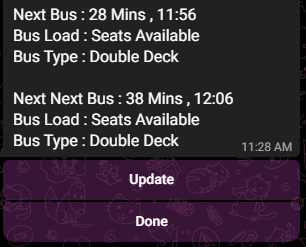
- The reply text bellow the message sent
- Most of a time it's a command
- Arguments needed:
- name: the text to be appear to the user
- data: the command behind the text
Get Input from Bot#
- This part is the input from bot
- The input will be taken in from the function called
doPost(e) - I've Split the input to 2 parts 1. First part is to check the type of data and if it is from a approved ID 2. Secondly it will then just run the function that the bot recieve
Bot Input#
function doPost(e) {
  var data = JSON.parse(e.postData.contents);

  // If it is a callback data from inline keyboard
  if (data.callback_query) {
    var id = data.callback_query.from.id;
    var text = data.callback_query.data;
    var mssgid = data.callback_query.message.message_id;
    var type = data.callback_query.chat;

    // Check ID
    if (id == myid || id == myid2) {
      from_bot(id, text, data)
      if (id != myid){
        sendText(myid,"@"+data.callback_query.from.username+" Just use a reply markup : "+text)
      }
    } else {
      sendText(id,"What you want?")
      sendText(myid,"@"+data.callback_query.from.username+" Just use a reply markup : "+text)
    }

  // If just normal input
  } else if (data.message) {
      var id = data.message.chat.id;
      var text = data.message.text;
      var mssgid = data.message.message_id
      var type = data.message.chat.type

      if (id != myid){
          sendText(myid,"@"+data.message.from.username+" Just type : "+text,undefined,false)
          forwardMessage(myid,id,mssgid)
      }

      if (type !== "group"){
        deleteMessage(mssgid,id)
      }

      if (text.includes('/info')) {
        return info(id,data)

      } else if (text.includes('/start')){
        return sendText(id,"Yes?")
      }

      // Check ID
      if (id == myid || id == myid2) {
        from_bot(id, text, data)

      } else {
        sendText(id,"What you want?")
        sendText(myid,"@"+data.message.from.username+" Just type : "+text)
      }
}
Explanation :#
- Firstly the data will be Parse
- Check if data is call back query ; from a reply markup
- Get the neccessar data such as id, message id and the text
- Check if ID is in equal to
myidwhich is set earlier on - I allowed another user to access my bot hence there is myid2 which I also added into the the variable earlier on - I added a line to send the a message to myself so that when other people are using my bot I will be informed (just for fun) - If some how someone sent a reply markup and the id is not from the approved list, it will reply back a text and informed me
- Same thing as call back query with just minor changes
- The changes:
- Delete message is it is a PM (Just to make the chat history looks neat)
- If the message is
/infoor/startthen the neccessary reply will be run
- The bot will called the next function when it is approved and will pass in the arguments:
- Chat ID
- Text from the bot
- The whole text data
Run function#
- When the ID is allowed, the following function will be run from the previous function
function from_bot(id, text, data) {
  var command = text.toLowerCase();

  if (data.message){
    var mssgid = data.message.message_id
  }

  if (command.includes('/info')) {
    return info(id,data)

  } else if (command.includes('/delete')) {
    return dell(text)

  } else if (command.includes('/help')){
    var newmsgid = Number(mssgid) + 1
    const delete_command = "/delete " + newmsgid + "," + id
    sendText(id,help_msg,reply_markup(["Done"], [delete_command]))

  } else if (command.includes('/rain')){
    var newmsgid = Number(mssgid) + 1
    const delete_command = "/delete " + newmsgid + "," + id
    sendText(id,rain(),reply_markup(["Done"], [delete_command]))


  } else {
    sendText(id, "Check command")
  }
}
This is just and example.
Deployment#
- Once the script is coded, time to deploy it
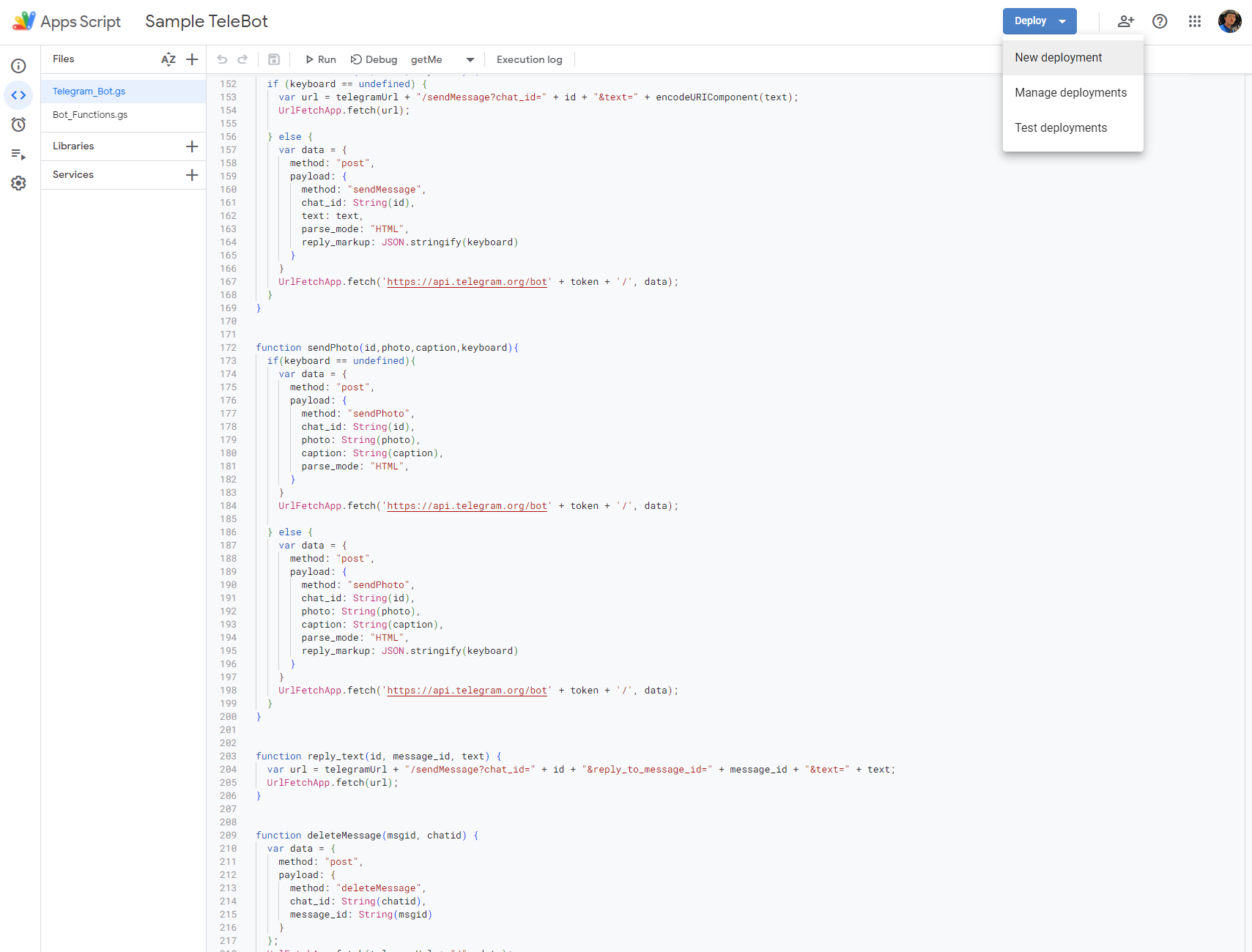
- On top Right there should be a Deployment button
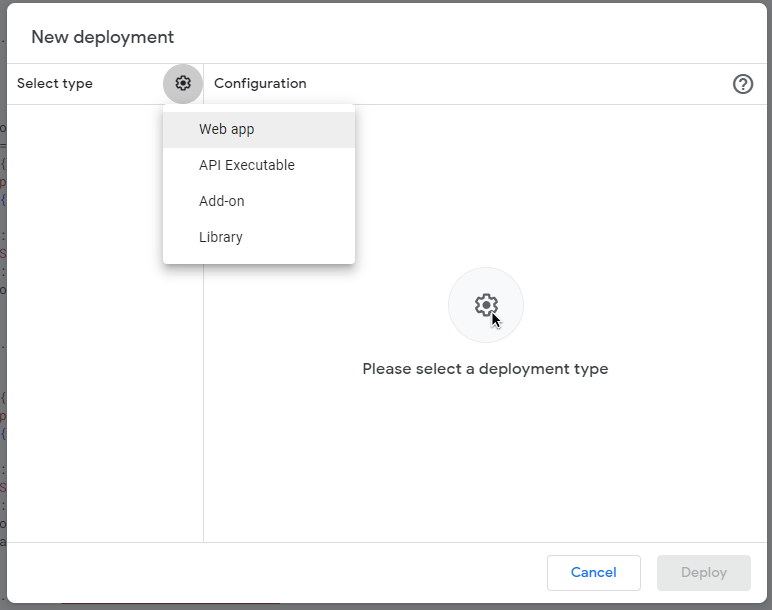
- Select New Deployment
- In New Deployment > Select Type : select Web app
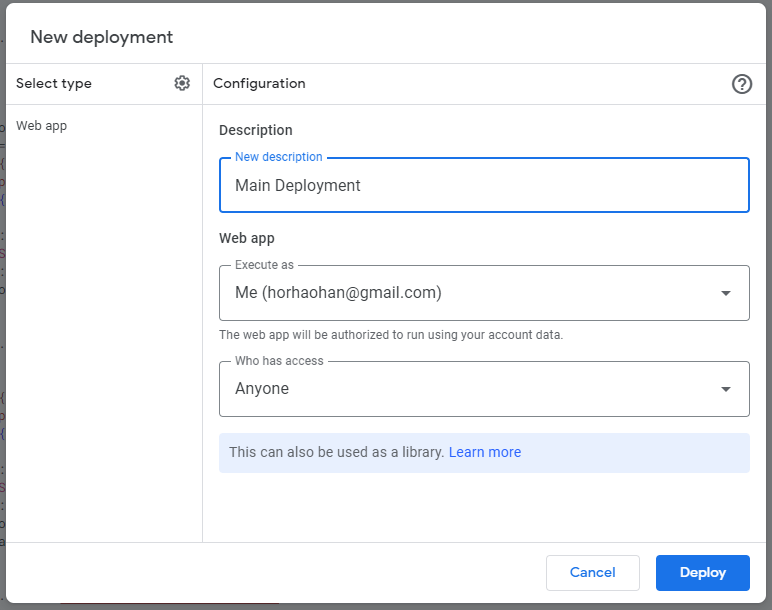
- Refer to picture bellow for configuration
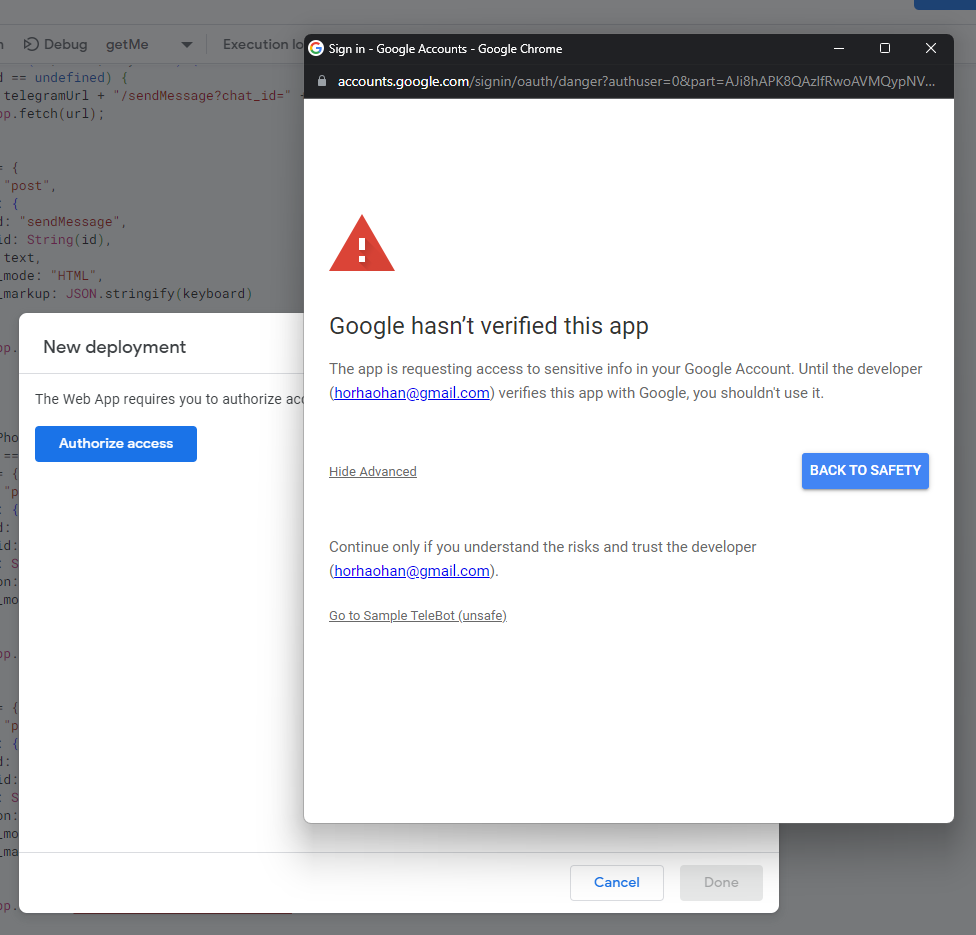
- Authorize access
- Select Go to
(unsafe) - Just allow everything
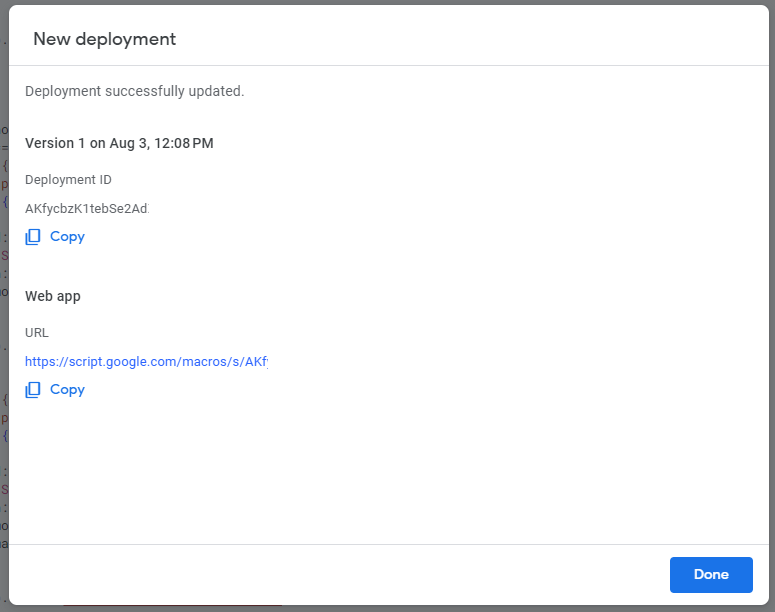
- Once completed, Web app url will be generated - Copy out the Web app URL
-
Insert the Web app URL into line 2 of your script
-
This time, instead of New deployment, select Manage deployment
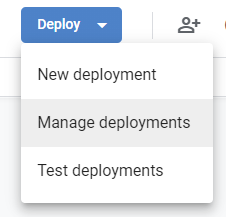
-
Press edit (the pencil icon on top right)
-
Select new version
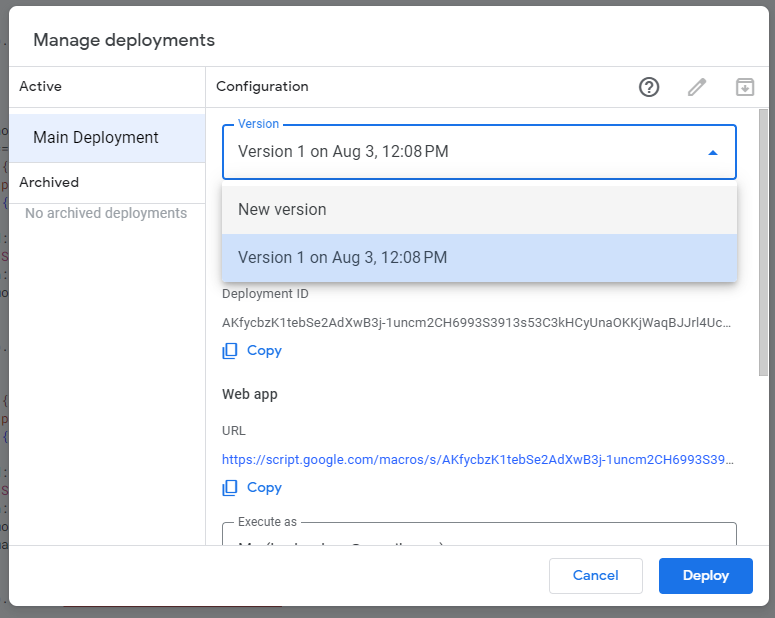
-
Description can put anything
-
Deploy
- Done! You can now try your bot in Telegram
The whole code#
var token = 'xxxxxxxxx1234zzzzz';
var webAppUrl = 'https://script.google.com/xxxxxxxx'
var telegramurl = 'https://api.telegram.org/bot' + token;
var myid = '123456789'

var help_msg = `
/info : for debuging

/help : this list will be printed

You can write anything in this text
`

// Initalise only ######################

function getMe() {
  var url = telegramUrl + "/getMe";
  var response = UrlFetchApp.fetch(url);
  Logger.log(response.getContentText());
}


function setWebhook() {
  var url = telegramUrl + "/setWebhook?url=" + webAppUrl;
  var response = UrlFetchApp.fetch(url);
  Logger.log(response.getContentText());
}


function removeWebhook() {
  var url = telegramUrl + "/setWebhook?remove";
  var response = UrlFetchApp.fetch(url);
  Logger.log(response.getContentText());
}


function doGet(e) {
  return HtmlService.createHtmlOutput("HHH's Bot");
}

// ###################### Useful part > Return to Telegram ######################

function setCommand() {
  var data = {
    method: "post",
    payload: {
      method: "setMyCommands",
      commands: JSON.stringify([
        {
          command: 'today',
          description: "See Today's Calendar"
        },
        {
          command: 'help',
          description: 'Get Help'
        }
      ]
      )
    }
  };
  UrlFetchApp.fetch(telegramUrl + '/', data);
}


function forwardMessage(id,from_chat_id,message_id){
  var data = {
      method: "post",
      payload: {
        method: "forwardMessage",
        chat_id: String(id),
        from_chat_id : String(from_chat_id),
        message_id : message_id,
        parse_mode: "HTML",
      }
    }
    UrlFetchApp.fetch('https://api.telegram.org/bot' + token + '/', data);
}


function sendText(id, text, keyboard,notification) {
  if (keyboard == undefined && notification == undefined) {
    var url = telegramUrl + "/sendMessage?chat_id=" + id + "&text=" + encodeURIComponent(text);
    UrlFetchApp.fetch(url);

  } else if (notification == false) {
    var url = telegramUrl + "/sendMessage?chat_id=" + id + "&text=" + encodeURIComponent(text) + "&disable_notification=True";
    UrlFetchApp.fetch(url);

  } else {
    var data = {
      method: "post",
      payload: {
        method: "sendMessage",
        chat_id: String(id),
        text: text,
        parse_mode: "HTML",
        reply_markup: JSON.stringify(keyboard)
      }
    }
    UrlFetchApp.fetch('https://api.telegram.org/bot' + token + '/', data);
  }
}


function sendPhoto(id,photo,caption,keyboard){
  if(keyboard == undefined){
    var data = {
      method: "post",
      payload: {
        method: "sendPhoto",
        chat_id: String(id),
        photo: String(photo),
        caption: String(caption),
        parse_mode: "HTML",
      }
    }
    UrlFetchApp.fetch('https://api.telegram.org/bot' + token + '/', data);

  } else {
    var data = {
      method: "post",
      payload: {
        method: "sendPhoto",
        chat_id: String(id),
        photo: String(photo),
        caption: String(caption),
        parse_mode: "HTML",
        reply_markup: JSON.stringify(keyboard)
      }
    }
    UrlFetchApp.fetch('https://api.telegram.org/bot' + token + '/', data);
  }
}


function reply_text(id, message_id, text) {
  var url = telegramUrl + "/sendMessage?chat_id=" + id + "&reply_to_message_id=" + message_id + "&text=" + text;
  UrlFetchApp.fetch(url);
}


function deleteMessage(msgid, chatid) {
  var data = {
    method: "post",
    payload: {
      method: "deleteMessage",
      chat_id: String(chatid),
      message_id: String(msgid)
    }
  };
  UrlFetchApp.fetch(telegramUrl + "/", data);

}


function create_reply_markup(name,data){
  var data =
          [{
            "text": name,
            "callback_data": data
          }]
  return data
}


function reply_markup(name,data){
  var make_button = {"inline_keyboard": []}
  var buttons = []
  var arrlenght = name.length

  for (var i = 0; i <arrlenght; i++){
    buttons.push(create_reply_markup(name[i],data[i]))
  }

  make_button.inline_keyboard = buttons
  return make_button
}


// ###################### INPUTS ######################


function doPost(e) {
  var data = JSON.parse(e.postData.contents);

  // If it is a callback data from inline keyboard
  if (data.callback_query) {
    var id = data.callback_query.from.id;
    var text = data.callback_query.data;
    var mssgid = data.callback_query.message.message_id;
    var type = data.callback_query.chat;

    // Check ID
    if (id == myid || id == myid2) {
      from_bot(id, text, data)
      if (id != myid){
        sendText(myid,"@"+data.callback_query.from.username+" Just use a reply markup : "+text)
      }
    } else {
      sendText(id,"What you want?")
      sendText(myid,"@"+data.callback_query.from.username+" Just use a reply markup : "+text)
    }

  // If just normal input
  } else if (data.message) {
      var id = data.message.chat.id;
      var text = data.message.text;
      var mssgid = data.message.message_id
      var type = data.message.chat.type

      if (id != myid){
          sendText(myid,"@"+data.message.from.username+" Just type : "+text,undefined,false)
          forwardMessage(myid,id,mssgid)
      }

      if (type !== "group"){
        deleteMessage(mssgid,id)
      }

      if (text.includes('/info')) {
        return info(id,data)

      } else if (text.includes('/start')){
        return sendText(id,"Yes?")
      }

      // Check ID
      if (id == myid || id == myid2) {
        from_bot(id, text, data)

      } else {
        sendText(id,"What you want?")
        sendText(myid,"@"+data.message.from.username+" Just type : "+text)
      }
}


function from_bot(id, text, data) {
  var command = text.toLowerCase();

  if (data.message){
    var mssgid = data.message.message_id
  }

  if (command.includes('/info')) {
    return info(id,data)

  } else if (command.includes('/delete')) {
    return dell(text)

  } else if (command.includes('/help')){
    var newmsgid = Number(mssgid) + 1
    const delete_command = "/delete " + newmsgid + "," + id
    sendText(id,help_msg,reply_markup(["Done"], [delete_command]))

  } else if (command.includes('/rain')){
    var newmsgid = Number(mssgid) + 1
    const delete_command = "/delete " + newmsgid + "," + id
    sendText(id,rain(),reply_markup(["Done"], [delete_command]))


  } else {
    sendText(id, "Check command")
  }
}